
If you've told your team to "just use AI" without a clear system behind it, you're not alone. You're also leaving real efficiency gains on the table.
Law firms that have moved past the experimentation phase aren't just using AI. They're using it with intention, guided by carefully structured prompts that align with their workflows, their practice areas, and their professional responsibility obligations. The difference between a firm that saves 15 hours a week per attorney and one that wastes time cleaning up bad AI outputs? It almost always comes down to how well the prompts are written.
This guide covers what's actually working in 2026, from the prompting frameworks that drive results, to the ethics rules you need to know, to how remote legal teams are amplifying the gains AI delivers.
Key Takeaways
- AI prompts are a professional skill. Specificity, context, and structure determine output quality.
- ABA Formal Opinion 512 (2024) governs generative AI use in legal practice. Compliance is not optional.
- The Mata v. Avianca case illustrates the real professional responsibility risks of unverified AI output.
- A standardized firm-wide prompt library improves consistency, quality control, and knowledge retention.
- Remote attorneys paired with structured AI workflows create a powerful efficiency multiplier for growing firms.
- Security due diligence on AI vendors is a requirement under ABA Model Rule 1.6(c).
Why AI Prompts Are Now a Core Legal Skill
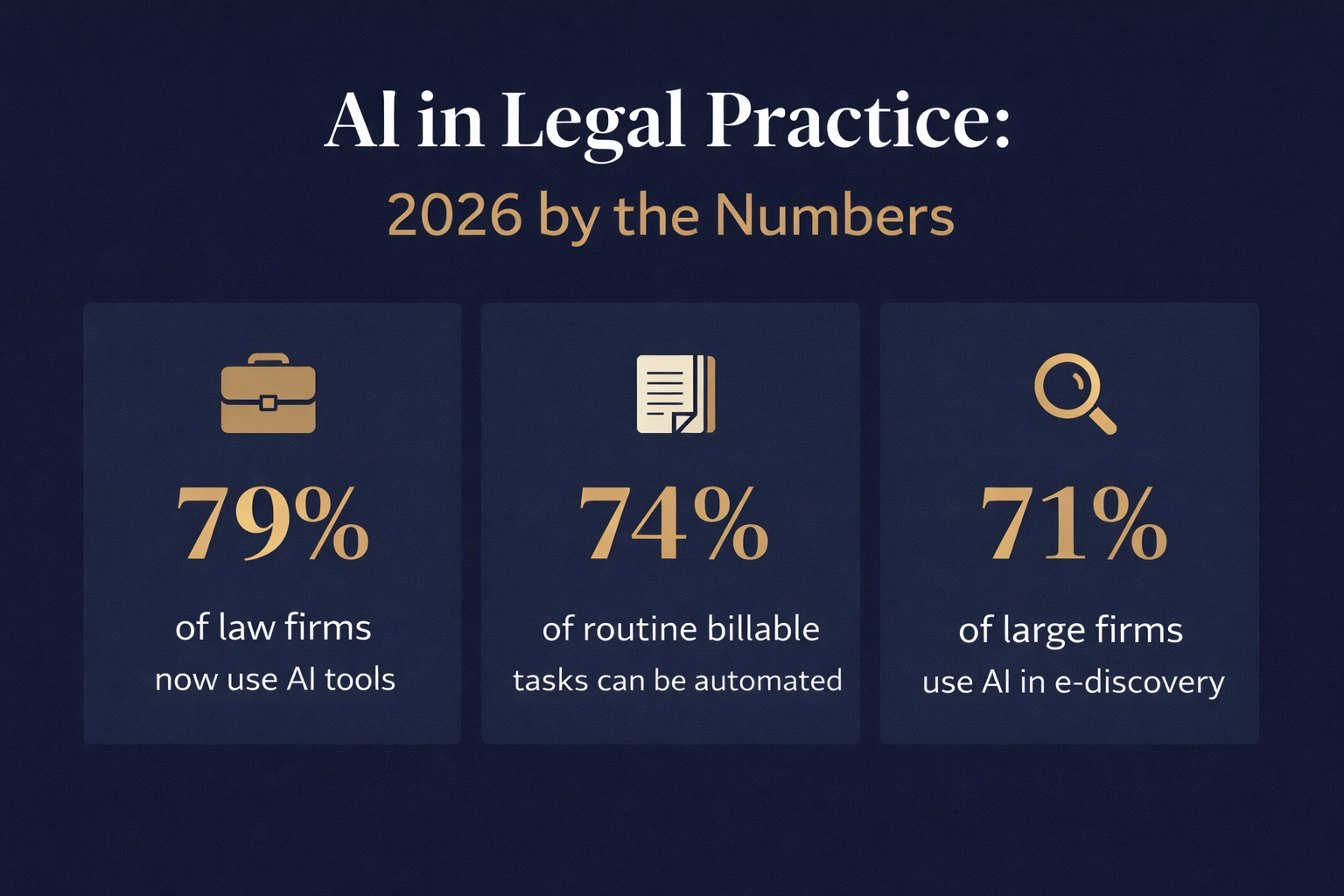
The legal industry's relationship with AI has matured fast. Industry data shows that 79 percent of law firms now use AI tools, with many automating up to 74 percent of routine billable tasks like legal research, document review, and discovery. Among large firms, AI adoption in e-discovery alone has reached 71 percent.
But adoption alone doesn't produce results. Firms are learning that two lawyers using the same AI tool can get completely different outcomes based on how they frame the task. That's the prompt problem, and it explains why some firms are pulling ahead while others are still cleaning up generic, unusable output.
A prompt isn't just a question typed into a chatbox. In a legal context, it's a structured instruction that defines the role the AI should play, the task it needs to perform, the constraints it must respect, and the format you expect. Think of it as drafting an assignment memo for a new associate. The more precise your instructions, the better the work that comes back.
The most valuable skill in 2026 is not rote legal execution. It's problem framing and workflow design.
Attorneys who master prompting are becoming, in effect, systems architects for their own practices, demonstrating how AI lawyers can improve efficiency while maintaining professional oversight.
The ABA Ethics Framework You Cannot Skip
Before rolling out AI prompts across your team, you need to understand where the compliance lines sit. In July 2024, the ABA issued Formal Opinion 512, which formally addresses generative AI use in legal practice.
ABA Formal Opinion 512 establishes that lawyers using generative AI must uphold the same professional duties that govern all legal work: competence, confidentiality, communication, candor toward the tribunal, and reasonable fees. The opinion specifically requires attorneys to understand the technology's limitations, including hallucination risks and training data biases, before delegating tasks to AI.
This connects directly to ABA Model Rule 1.6(c), which requires lawyers to make reasonable efforts to prevent the unauthorized disclosure of client information. The practical implication is that not every AI tool is appropriate for every legal task.
Consumer AI tools lack the confidentiality architecture and legal-specific training that professional legal work requires. The distinction between a general-purpose chatbot and a professional-grade legal AI platform is not a technical nuance. It's a compliance requirement in 2026.
The Mata v. Avianca case is still the sharpest illustration of what goes wrong when attorneys skip the verification step. AI-generated citations that didn't exist were submitted to a federal court, resulting in sanctions. Every citation, every redline, and every AI-produced recommendation needs attorney review before it touches a filing, a client, or a court.
The bottom line: every AI output is a first draft. The attorney signing off on it is still fully responsible for the work product.
The Anatomy of a High-Quality Legal Prompt
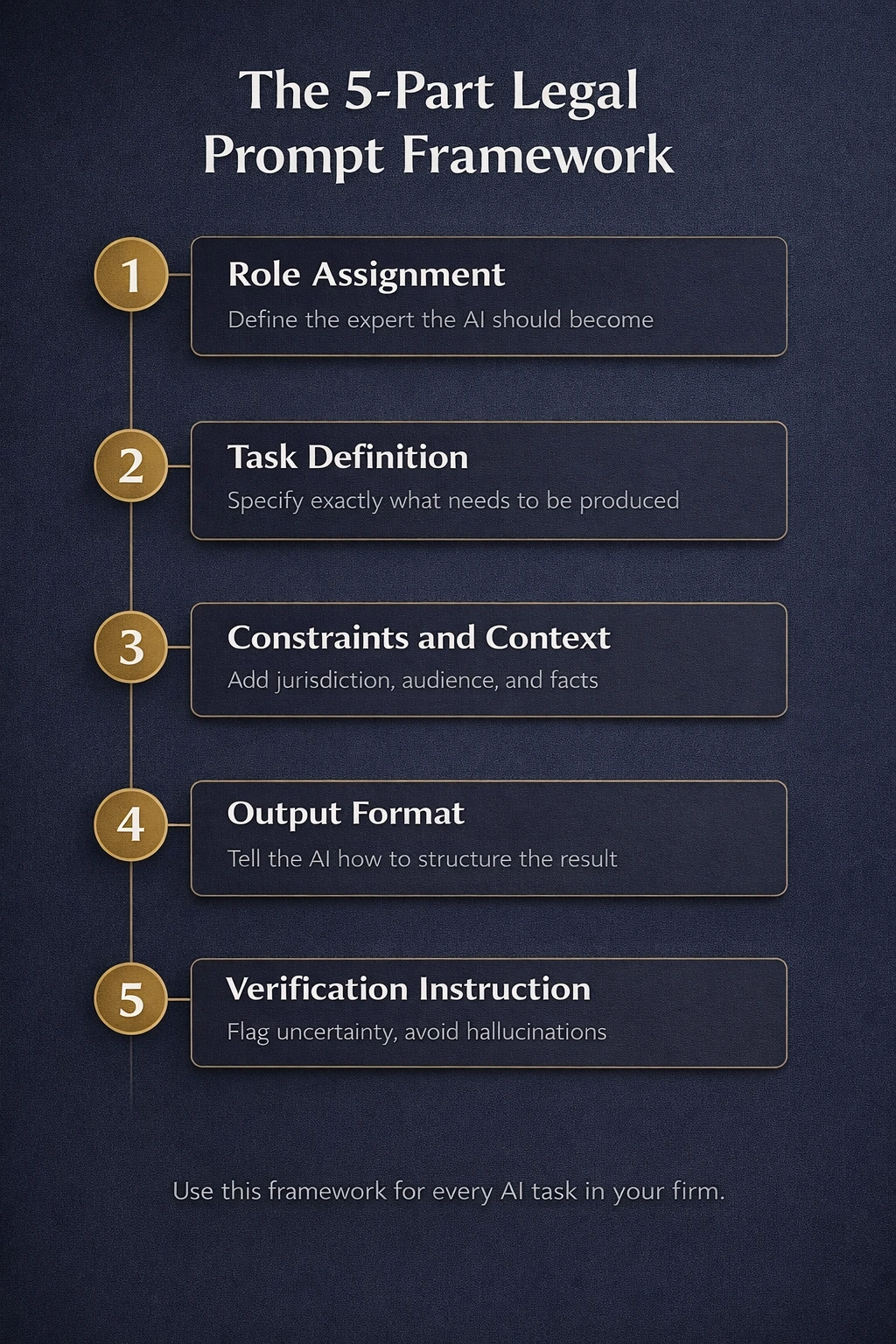
Effective legal prompts share a consistent structure. Whether you're drafting a contract, summarizing a deposition, or preparing a client update, the best prompts follow this five-part framework.
- Role Assignment: Tell the AI what kind of expert it should act as. "Act as a contracts attorney with experience in California employment law" produces far better output than "write a contract."
- Task Definition: Be specific about what you need. "Draft a mutual NDA" is too vague. "Draft a mutual NDA between a SaaS company and an independent contractor, covering confidentiality obligations, a two-year term, permitted disclosures, and breach remedies" gives the AI a clear deliverable to work toward.
- Constraints and Context: Include jurisdiction, audience, tone, and any relevant facts. AI tools have no knowledge of your client's situation unless you provide it.
- Output Format: Specify how you want the result structured: bullet points, clause-by-clause breakdown, plain language summary, or formal memorandum format. Leaving this open usually means more cleanup on your end.
- Verification Instruction: For any research-related prompt, close with: "Do not cite cases you are not certain exist. Flag any areas where the law is unsettled." This one line reduces hallucination risk at the source.
22 Ready-to-Use AI Prompts by Legal Task
The prompts below are structured for use with legal-grade AI tools such as Harvey AI, Spellbook, Lexis+ AI, or Clio Manage AI, or any capable large language model running within your firm's secure, approved environment.
Contract Drafting and Review
These prompts help you produce first drafts faster and spot the clauses that are missing, unclear, or weighted against your client — exactly the kind of work handled through contract drafting and review support
1. Basic NDA
"Act as a transactional attorney. Draft a mutual non-disclosure agreement between a technology startup and a freelance software developer, governed by California law. Include definitions of confidential information, obligations of both parties, a two-year term, permitted disclosures, and specific remedies for breach."
2. Contract Risk Summary
"Act as a contract analyst. Review the following agreement and provide a clause-by-clause risk summary. Flag obligations with ambiguous language, identify any missing standard protections, and highlight termination and indemnification provisions."
3. Redline Review
"Act as a senior contracts attorney. Compare the following two versions of this service agreement and summarize all material changes. Identify which changes favor our client and which create new exposure."
Legal Research Support
Good legal research takes time, and AI can compress the early stages of it. Use these prompts to get oriented on an issue quickly, then verify outputs before relying on them in any work product.
4. Negligence Standard
"Act as a legal researcher. Explain the elements required to establish negligence under Texas law. Provide a plain-language summary suitable for a client, then a more technical summary for the supervising attorney. Do not cite cases unless you are certain they exist."
5. Regulatory Overview
"Act as a compliance attorney. Summarize the current federal requirements for employee non-compete agreements following the FTC's 2024 rulemaking and any subsequent judicial developments. Flag any areas of ongoing legal uncertainty."
Document Summarization
Legal documents are long by design, but the time it takes to get through them does not have to be. These prompts help you extract what matters fast, whether you are reviewing a contract for a client or preparing a deposition summary for the supervising attorney.
6. Long Contract
"Act as a legal analyst. Summarize the following 40-page vendor agreement in no more than one page. Highlight key obligations, payment terms, IP ownership clauses, liability limitations, and exit provisions."
7. Deposition Transcript
"Act as a litigation support specialist. Review the following deposition transcript and extract: (1) key admissions, (2) internal inconsistencies, (3) statements relevant to liability, and (4) credibility issues. Present findings in a structured table."
Case Summaries and Reporting
Between documents, calls, and notes, keeping track of where a case stands takes real effort. These prompts help you pull that information together into something clear and usable without building it from the ground up each time.
8. Internal Case Summary
"Act as a legal assistant. Using the case notes below, create a structured internal case summary covering current status, key facts, pending tasks, upcoming deadlines, and risks to monitor. Format it so the supervising attorney can review it in under two minutes."
9. Client-Facing Case Update
"Act as a legal assistant. Using the following case notes, draft a plain-language progress report for the client. Summarize developments in plain English, avoid legal jargon, and close with a clear statement of what happens next and when."
Client Communication
How you communicate with clients shapes how they experience your firm. These prompts help you respond to difficult situations with the right tone and set clear expectations from the very first interaction, without starting from a blank page every time.
10. Difficult Client Response
"Act as a client relations manager at a law firm. Draft a professional, empathetic response to a client who is frustrated about case delays. Acknowledge their concerns, provide context without over-promising, and offer a concrete action step."
11. Intake Confirmation
"Act as a legal administrative assistant. Draft a confirmation email to a new personal injury client following their intake call. Include next steps, the documents they need to provide, and a tone that sets realistic expectations without creating anxiety."
Litigation Support
A lot of litigation support work follows the same patterns from one case to the next. These prompts take care of the repeatable drafting tasks so attorneys can spend their time on the parts that actually require judgment.
12. Demand Letter
"Act as a litigation attorney. Draft a demand letter on behalf of a client whose former employer failed to pay $18,000 in unpaid commissions. The jurisdiction is New York. Keep the tone firm but professional and include a 14-day response deadline."
13. Case Theory Summary
"Act as a trial strategist. Based on the following case facts, draft a one-page theory of the case from the plaintiff's perspective. Identify the strongest factual arguments, the key legal theories to pursue, and the anticipated defense arguments."
14. Discovery Request
"Act as a litigation support attorney. Draft a set of interrogatories for a breach of contract case involving a failed software implementation. Target the defendant's internal communications, project timelines, and deliverable acceptance records."
Legal Operations and SOPs
Consistent processes reduce errors and make onboarding easier. These prompts help you document how your firm operates so that quality doesn't depend on any one person remembering the steps.
15. Client Intake SOP
"Act as a legal operations manager. Write a step-by-step standard operating procedure for new client intake at a personal injury law firm. Include each stage from first contact to retainer signing, required information at each stage, the responsible team member, and quality control checkpoints."
16. AI Usage Policy
"Act as a legal compliance officer. Draft an internal policy governing attorney use of generative AI tools. Address approved platforms, confidentiality requirements under Model Rule 1.6, output verification requirements, prohibited uses, and consequences for violations."
Remote Team Coordination
When your team is not in the same room, clear communication matters even more. These prompts give you ready-made formats for assigning work and following up on it without needing constant back and forth.
17. Task Delegation Brief
"Act as a supervising attorney. Draft a task assignment memo for a remote contract attorney handling initial document review for a commercial litigation matter. Include scope of work, turnaround expectations, citation and formatting standards, and escalation protocol."
18. Weekly Status Report Template
"Act as a legal project manager. Create a weekly status report template for remote attorneys to complete. Include sections for tasks completed, hours logged, outstanding items, blockers encountered, and priority tasks for the coming week."
Law Firm Marketing and Content
Most potential clients don't understand legal services well enough to know when they need help. These prompts help you create content that explains what you do in terms people can act on.
19. Blog Post
"Act as a legal content strategist. Write a 700-word blog post for small business owners explaining why an operating agreement is essential even for single-member LLCs. Use plain language, include three practical examples, and end with a call to action."
20. LinkedIn Post Series
"Act as a digital marketing specialist for a boutique immigration law firm. Write three LinkedIn posts that educate potential clients about the EB-2 NIW visa category. Keep each post under 200 words, make them informative and approachable, and avoid specific legal advice."
21. Client Newsletter
"Act as a marketing coordinator for a law firm. Draft content for a monthly client newsletter that summarizes three recent developments in employment law affecting small businesses. Keep the tone accessible to non-lawyers and close each item with a practical takeaway."
22. Client Engagement Campaign
"Act as a legal marketing manager. Develop a short campaign plan to attract startups needing legal compliance support. Include suggested messaging, target audience, and content ideas for email, social media, and the firm website."
Building a Firm-Wide Prompt Library
Individual prompts are useful. A standardized prompt library is a competitive asset.
Here's how leading firms are structuring theirs.
- Categorize by task type. Organize prompts under headings: Drafting, Research, Summarization, Client Communication, Litigation, and Operations. Each category should have 5 to 10 validated prompts that your team can use without reinventing the wheel each time.
- Include usage notes. Each prompt should indicate the recommended AI tool, any review requirements before use, and jurisdictional limitations where they apply.
- Version control your prompts. As AI tools evolve and your firm refines its standards, prompt quality should improve over time. Assign ownership to a legal operations manager or a designated AI champion inside the firm.
- Restrict access by role. Prompts tied to sensitive practice areas or client-specific workflows should have role-based access controls. Not every team member needs access to everything.
Successful legal AI adoption in 2026 is not just about picking the right tool. It's about building the systems, governance structures, and team habits that make the tool worth using. A well-maintained prompt library is one of the simplest and highest-return investments a firm can make.
Security and Confidentiality: What Firms Must Get Right
Confidentiality risk is the most significant concern in legal AI adoption, and it is not hypothetical.
AI vendors must confirm that they do not retain client inputs beyond the session window and that they never use your firm's work product to improve their general models. These contractual terms directly support the confidentiality obligations of ABA Model Rule 1.6(c) and protect against the inadvertent disclosure that occurs when a competitor-facing AI system gets trained on your client's litigation strategy.
Before deploying any AI tool for client work, get clear answers to these questions:
- Does the platform have a Data Processing Addendum?
- Does the vendor retain prompts after logout?
- Can the vendor certify that your firm's data is never used for model training?
- Are there admin controls for revoking AI access when attorneys leave the firm?
When you're unsure about a platform, anonymize client data before inputting it. Replace names, dates, and identifying details with placeholders. This preserves the utility of AI-assisted work without creating a confidentiality exposure.
5 Prompting Mistakes Law Firms Make Most Often
Getting useful output from AI comes down to how well you ask. These are the most common places where prompts break down and what to do instead.
- 1. Using vague role assignments. "Act as a lawyer" gives the AI almost nothing to work with. Be specific about practice area, jurisdiction, audience, and context. The more you narrow the role, the more precise the output.
- 2. Skipping the output format instruction. Unformatted AI responses create extra cleanup time. Before the AI starts writing, specify exactly what format you need: bullet points, numbered clauses, memo structure, a comparison table, or plain paragraphs.
- 3. Over-automating tasks that require direct judgment. AI works well for first drafts, research summaries, and document review support. It is not a substitute for legal opinions, court filings, or client advice. Firms that hand off critical tasks entirely to AI, without meaningful attorney review, expose themselves to malpractice risk and ethical violations.
- 4. Ignoring jurisdictional differences. A prompt that works well for a California contract may produce unreliable output for a New York or Texas matter if jurisdiction isn't specified. Always include the governing state or jurisdiction and verify that AI-produced legal conclusions match local requirements.
- 5. Running AI outside your existing workflows. AI tools that operate in isolation from your practice management system, document storage, and communication platforms create more friction than they remove. The goal is integration, not addition. Tools that live where lawyers already work see faster adoption and produce more consistent results.
AI Prompts and Remote Legal Teams: The Multiplier Effect
Here's what a lot of firms are still missing. AI prompts and remote attorneys are not competing strategies. They work better together than either does alone.
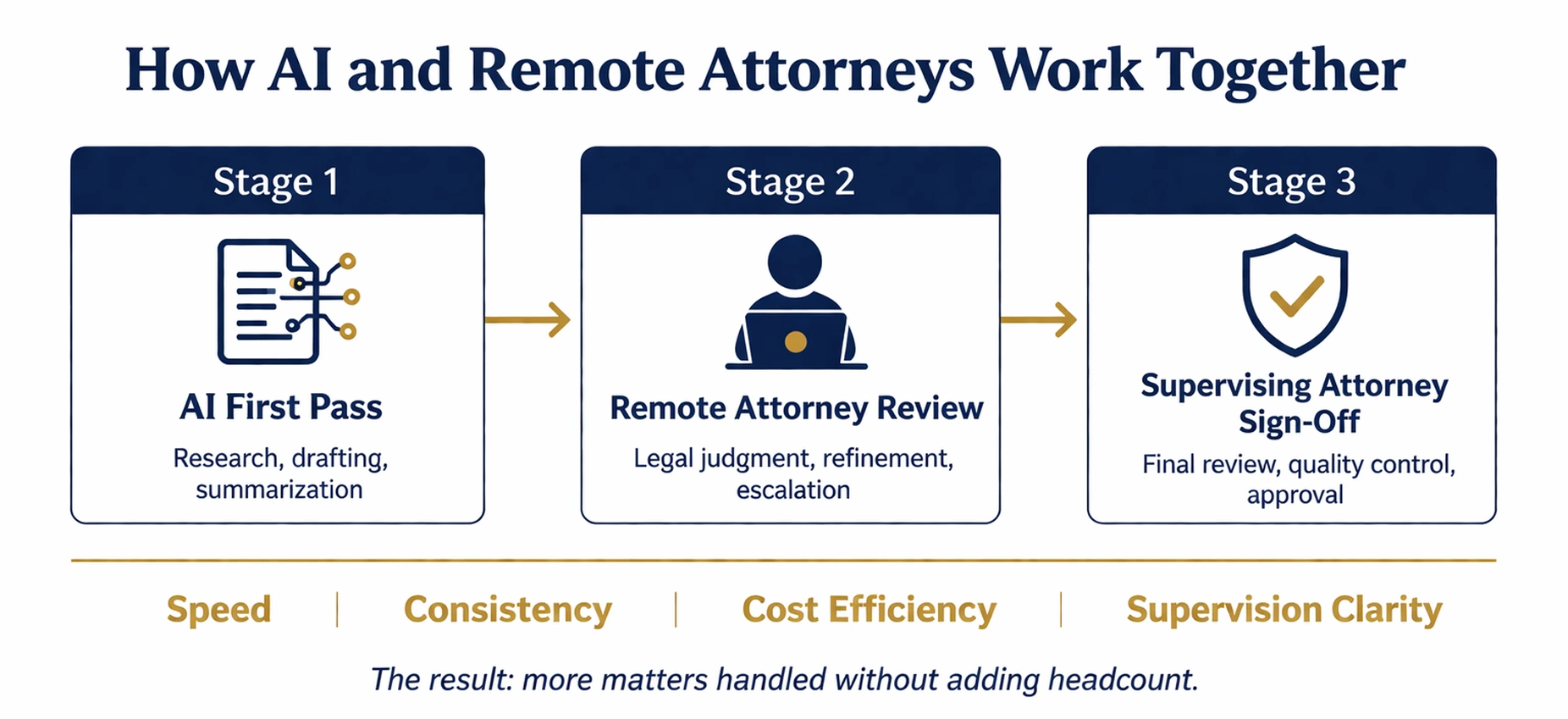
Remote attorneys and paralegals trained in your practice area become significantly more productive when paired with well-structured prompts. The AI handles the first pass on research, drafting, and summarization. The remote attorney applies legal judgment, refines the output, and escalates anything that needs closer review. The supervising attorney gets cleaner, faster work product without adding headcount.
This combination delivers at several levels.
- Speed. A remote attorney working from a structured prompt library can produce a first-draft NDA or case summary in a fraction of the time it would take starting from scratch.
- Consistency. Standardized prompts keep output quality steady regardless of which remote team member handles a task.
- Cost efficiency. When remote attorneys are equipped with AI tools and clear prompt frameworks, firms absorb higher caseloads without proportional increases in overhead.
- Supervision clarity. When remote teams follow prompt-based workflows, supervising attorneys have a known standard to review against. Quality control gets faster and more predictable.
The firms seeing the strongest results in 2026 are not choosing between AI efficiency and human legal expertise. They are building teams where both work together from the start.
Where Legal AI Is Heading and What It Means for Your Firm
The trajectory is clear. Legal AI is moving from assistive technology toward reasoning systems that reflect how law actually operates in practice. Platforms are shifting from general-purpose tools to workflow-specific solutions built around defined practice areas, document types, and matter stages.
For law firms, that shift changes the hiring and staffing calculus. Firms that build structured AI workflows today will get compounding returns as the tools improve. Firms that wait are not just falling behind on efficiency. They are falling behind on the institutional knowledge and process infrastructure that makes AI genuinely useful.
The practices best positioned for the next few years are not necessarily the largest or the most tech-forward. They are the ones that are deliberate: clear on which tasks AI should handle, honest about where human judgment is irreplaceable, and proactive about building the governance frameworks that keep both working together.
Remote Attorneys connects law firms with experienced, pre-vetted remote attorneys and paralegals trained in U.S. legal standards, starting at $20/hour. If your firm is ready to combine AI-powered workflows with skilled remote legal talent, book a demo to see how it works.

.webp)