

Choosing between MyCase vs Filevine is one of the most common decisions small and mid-sized firms face when modernizing their practice management stack. Both platforms centralize client intake, billing, documents and case tracking. They are built for different kinds of practices, and picking the wrong one costs you money, staff time and months of rework.
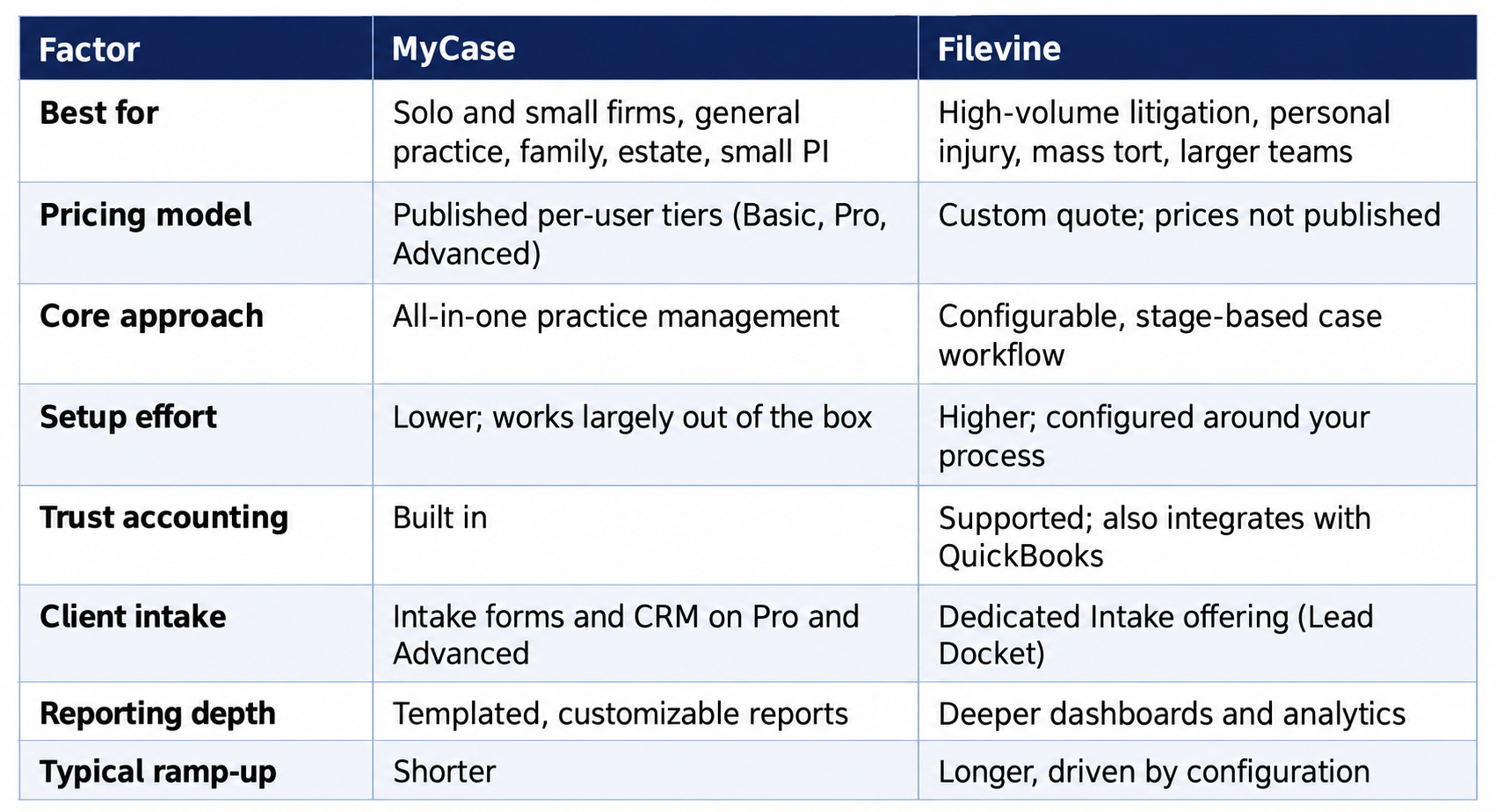
MyCase is an all-in-one platform for solo and small firms that want billing, client communication and document management under one roof at a published price. Filevine is a configurable, stage-based platform built with litigation-heavy and high-volume practices in mind, with deeper workflow automation and reporting, and pricing that is quoted per firm.
This guide compares the two on pricing, intake, billing and trust accounting, automation, reporting, integrations, AI, implementation and fit by practice area. It also covers how Clio fits in as a third option, what reviewers tend to say, and how to run a trial that gives you a real answer. If you only have a minute, start with the quick verdict below.
Quick Verdict: MyCase vs. Filevine
Choose MyCase if you are a solo or small firm (roughly 1 to 15 users), want a published per-user price, need billing, trust accounting, a client portal and intake in one product, and want staff productive quickly.
Choose Filevine if you run a high-volume litigation, personal injury or mass tort practice, need stage-based workflows, automated task triggers and deep reporting across hundreds of active files, and have the budget and time for a configured implementation.
What Does MyCase Offer Law Firms?
Built for Solo and Small Firm Workflows
MyCase bundles case and contact management, time tracking, invoicing, trust accounting, online payments, document storage and a client portal into one subscription. It is often the first platform a firm adopts because setup is fast and the learning curve is shallow for staff who are new to legal software.
Firms that rely on virtual paralegal services tend to appreciate MyCase's straightforward task assignment, since remote staff can be onboarded without extensive training on complex automation rules.
MyCase Plans and Features
MyCase sells three tiers, each building on the one below:
- Basic: case and contact management, time entry, invoicing and trust accounting, online payments, customizable reporting, unlimited document storage and a limited client portal.
- Pro: adds unlimited e-signatures and document generation, automated workflows, client intake forms and a legal CRM, two-way texting, premium billing and reporting, and 70+ integrations.
- Advanced: adds advanced document automation, AI-assisted case and discovery tools, conflict check tracking, split billing and an open API.
Client Communication and Portal Features
The client portal is one of MyCase's strongest selling points. Clients can log in to check case status, review invoices, pay online and message staff directly, which cuts down on routine "what's happening with my case" phone calls that otherwise eat into paralegal time.
The portal also supports e-signatures and secure document sharing, so firms do not need a separate tool for routine client-facing paperwork. For high-touch, communication-heavy practices such as family law and estate planning, this is often the deciding factor over Filevine's deeper but more complex feature set.
Where MyCase Falls Short
- Thinner automation: firms handling complex, multi-phase litigation often end up building manual checklists instead of relying on the system to advance case stages automatically.
- Tier gating: several features firms assume are standard, including intake forms, automated workflows and e-signatures, sit in Pro or above, so the real cost for many firms is the Pro tier.
- Less depth for volume: firms tracking hundreds of active matters tend to outgrow templated reporting.
What Does Filevine Offer Law Firms?
Project-Management-Style Case Tracking
Filevine organizes cases around customizable stages, dynamic fields and automated task triggers. That makes it a strong fit for personal injury, mass tort and other high-volume litigation practices that need to track many active files at once and move each one through a defined process.
According to TheDigitalPM's comparison, Filevine's reporting and document automation tools generally rank higher for firms managing large caseloads, while MyCase scores better on ease of use and price for smaller teams.
The Filevine Product Family
Filevine is less a single product than a platform of modules. Its public pricing page lists four offerings plus an AI layer:
- Matters: the central case hub, with extensions such as business analytics, deadline management, a client portal and integrations.
- Intake: lead capture and qualification, including Lead Docket and AI-assisted lead tools.
- Depositions: scheduling, hosting and review, with AI summaries.
- Signatures: e-signature through Vinesign.
- LOIS: Filevine's AI suite for drafting, document Q&A, legal research and medical chronologies.
Firms should confirm exactly which modules are in a quote, because a package that looks comparable to MyCase on paper may leave out pieces (e-signature, intake, client portal) that MyCase includes in its tiers.
Reporting and Analytics Depth
Filevine's reporting goes further than MyCase's, letting firms build custom dashboards around case stage, intake source, settlement value or attorney caseload. For managing partners who need visibility across dozens or hundreds of active files, that depth can justify the price on its own.
The tradeoff is setup time. Filevine's reporting is powerful but needs more upfront configuration than MyCase's templated reports, so budget implementation time instead of expecting plug-and-play.
Where Filevine Costs More
Filevine pricing is quote-based and tailored to the firm, so there is no public per-user number to anchor on. Cost typically scales with users and the modules you add, and implementation is handled through certified partners. For firms under 10 attorneys, that usually makes it a heavier investment than MyCase.
MyCase vs. Filevine Pricing: What Each Really Costs
Pricing is the question searchers ask most, and it is where the two vendors differ most in transparency. MyCase publishes its rates. Filevine does not.
MyCase Pricing (per user, per month)

MyCase states that annual billing saves up to 16 percent and offers a 10-day free trial with no credit card. Some items are priced on top of the subscription: MyCase Accounting is $39 per accounting user per month, and extra AI discovery pages are sold in blocks. Card processing runs through its payments provider, so factor in processing fees for any firm that collects online.
MyCase changed its plan structure in early 2026, so older comparison articles that quote $39 or $109 per user are out of date. Always check the live pricing page.
Filevine Pricing: How Much Does Filevine Cost per Month?
Filevine does not publish prices. Its site says packages are custom built for each team and directs visitors to request a quote. There is no honest public per-user figure to give you, and third-party sites that list one are estimating.
What you can control is the quote. Ask for these in writing:
- Per-user price and the minimum user count
- Which modules are included (Matters, Intake, Signatures, client portal, analytics)
- One-time implementation and migration fees, and whether a partner handles them
- Contract term, auto-renewal terms and the price-increase cap at renewal
- Costs for additional AI features, storage and API access
Worked Example: Annual Cost for a Five-User Firm on MyCase
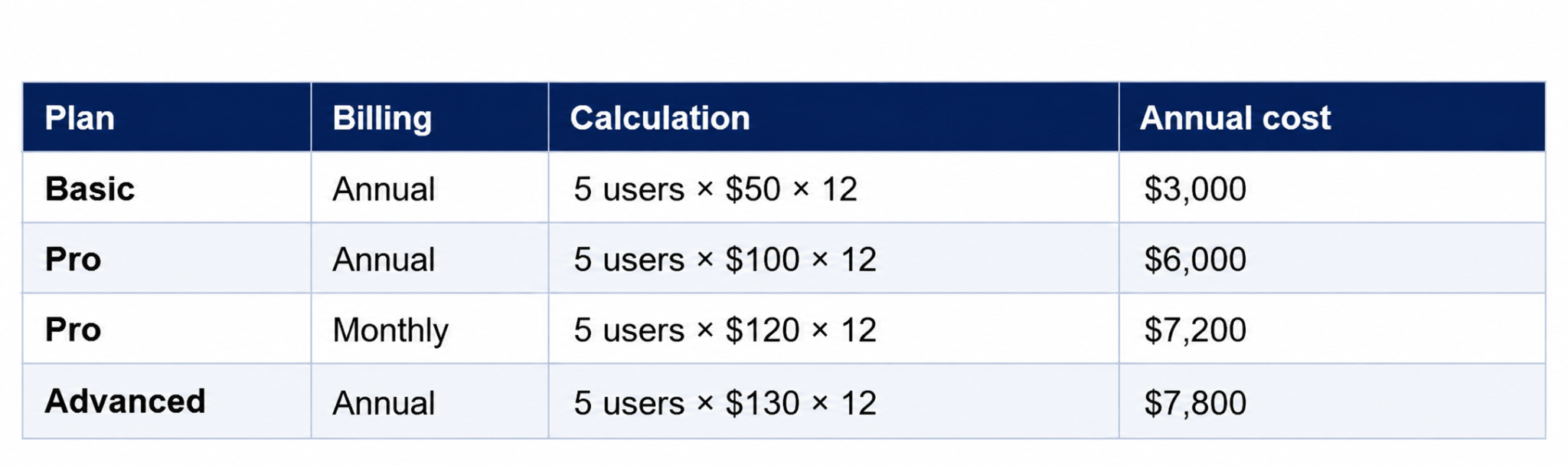
These figures cover subscription fees only, before payment processing, the accounting add-on and implementation time. For a Filevine comparison, request a quote for the same five users and the same feature list, then compare total first-year cost, not the headline rate.
Our rule of thumb: if the Filevine quote is meaningfully higher and your matter volume is modest, you are paying for automation you will not use. If you manage hundreds of active files, the extra cost often pays back in staff hours.
MyCase vs. Filevine: Side-by-Side Feature Comparison
Client Intake and Lead Management
MyCase includes client intake forms and a legal CRM on its Pro and Advanced tiers. The intake process is simple and quick to set up, which suits firms with a steady but modest flow of new matters.
Filevine treats intake as its own offering, with lead capture, qualification and automation. For personal injury firms that buy leads, track sources and need to convert fast, that depth matters. For a small firm taking a handful of new clients a week, it may be more than you need.
Billing and Trust Accounting
Both platforms support trust accounting. MyCase's billing workflow is simpler out of the box and includes time tracking, invoicing and online payments in the base subscription. Filevine's accounting is typically paired with its integrations and billing modules, and the vendor positions its QuickBooks integration for invoices, expenses and trust reporting.
Whichever you choose, verify that the platform supports three-way reconciliation and keeps trust and operating funds separate, since bar rules on client funds are strict and vary by state.
Workflow Automation and Document Assembly
This is Filevine's home turf. Stage-based workflows, dynamic fields and task triggers let a firm define what happens at each phase of a case and assign the work automatically. MyCase offers automated workflows and document generation on Pro and Advanced, but with less configurability.
Integrations: Does MyCase or Filevine Integrate With QuickBooks?
Yes to both. Filevine publishes a QuickBooks integration covering invoices, expenses, time and trust accounting data, and MyCase lists QuickBooks among the 70+ integrations available with its higher tiers. The details differ by plan and setup, so ask each vendor which data syncs, how often, and whether it works with QuickBooks Online or Desktop.
AI Features
Both vendors now sell AI. MyCase builds AI assistants for writing, case review and discovery into its Pro and Advanced tiers. Filevine's LOIS suite covers drafting, document Q&A, research, deposition summaries and medical chronologies. If AI is a deciding factor, test it on your own documents during the trial and ask where client data is processed and stored.
Implementation, Training and Support
MyCase positions itself as ready out of the box, with in-house support and free training. Filevine implementations are usually handled with certified partners, which adds time and cost but produces a system fitted to your process. Neither is wrong. The question is whether you want speed or fit.
Best Fit by Practice Area
- Solo and small general practice: MyCase, for simplicity and cost predictability.
- Family law and estate planning: MyCase, for portal, e-signatures and payments.
- Personal injury and mass tort: Filevine, for stage-based tracking, intake and case chronologies at scale.
- Mid-sized litigation firms: Filevine, or MyCase Advanced if volume is moderate.
- Firms prioritizing fast staff onboarding: MyCase, due to its shorter learning curve.
- Firms using distributed or offshore staff: either platform works, but task clarity matters more than feature count.
Where Does Clio Fit? MyCase vs. Filevine vs. Clio
Many buyers searching "MyCase vs Filevine" are also weighing Clio, the third name that appears in nearly every shortlist. Here is how the three typically differ at a high level.
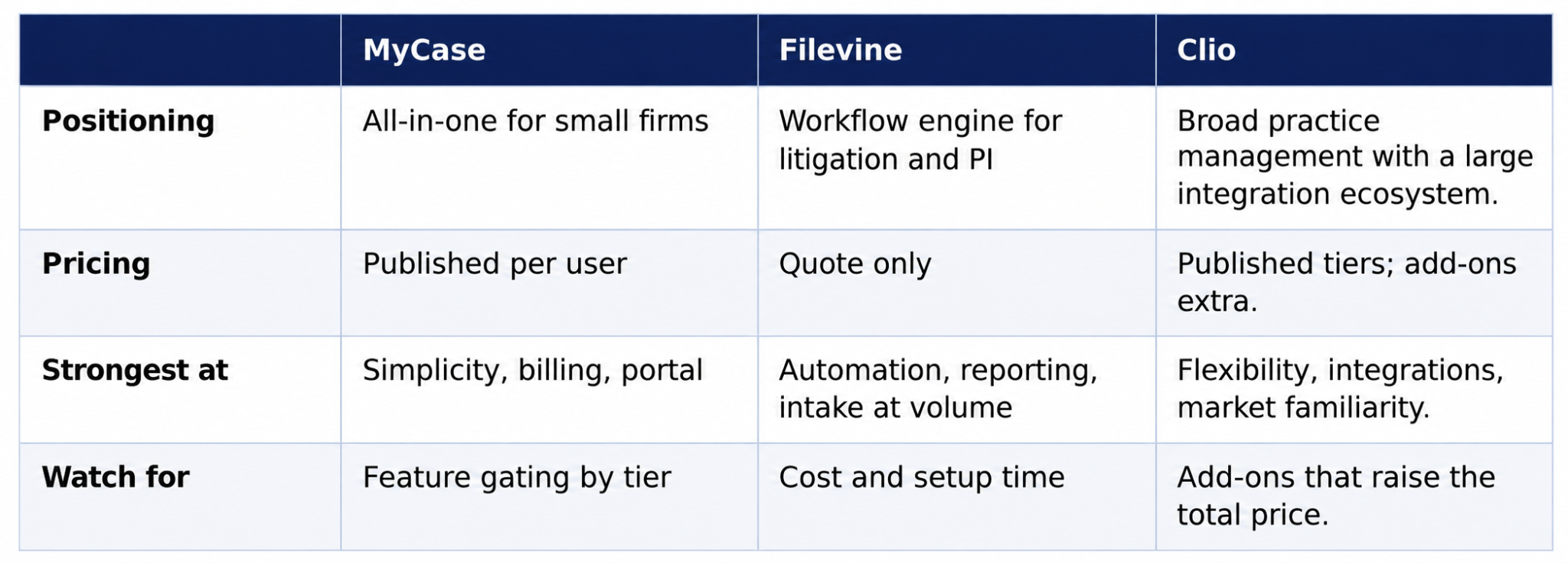
If you are comparing all three, apply the same test to each: run your five most common matter types through a trial, price the full stack including add-ons, and ask for references from firms your size and practice area.
What About a MyCase Alternative?
Firms that outgrow MyCase usually move up to Filevine or Clio. Firms that find MyCase too heavy sometimes look at lighter tools. Before you switch, confirm the problem is the software and not the way it was configured or staffed. Many "bad software" complaints trace back to inconsistent data entry rather than missing features.
Personal Injury Firms: MyCase vs. Filevine
Personal injury is where this decision matters most, because PI firms live and die on intake speed, case stage visibility and settlement tracking. Look at five things:
- Lead intake and source tracking: can you see which marketing source produced each signed case?
- Stage-based workflow: does the system move a case from intake to demand to negotiation to settlement and flag what is overdue?
- Medical records and chronologies: how quickly can staff summarize records for a demand package?
- Settlement and liens reporting: can you report on value, costs and liens by attorney?
- Caseload visibility: can a managing partner see every file's status on one dashboard?
Filevine is built around these needs, which is why it dominates PI shortlists. A small PI firm with a modest caseload can still run well on MyCase Pro or Advanced. A firm managing hundreds of active files, multiple intake channels and heavy medical documentation will usually feel the gap.
What Do Lawyers Say? Reviews and Community Feedback
Reviews on Capterra, G2, TrustRadius and communities such as r/paralegal give useful signal if you read them for patterns instead of star ratings. The themes that show up most often are consistent with the product positioning above:
- MyCase reviewers tend to praise ease of use, the client portal and billing. Complaints center on limits at higher volume and features sitting in higher tiers.
- Filevine reviewers tend to praise customization, workflow automation and reporting. Complaints center on cost, complexity and the time needed to configure it.
Treat any single review with caution. Filter by firm size and practice area, check the date, and give more weight to reviewers who describe the same workflow you run. Vendor-published comparison pages, including MyCase's own, are marketing and should be verified independently.
Are MyCase and Filevine Legitimate?
Yes. Both are established legal technology vendors with real customers, public product documentation and listings on the major software review sites. Neither is a scam, and "is it legitimate" is usually a proxy for "will it be reliable and will they treat my data properly."
To answer that for your firm, ask each vendor for:
- Security documentation and independent audit reports (such as SOC 2)
- Data export terms, so you can leave with your records intact
- Uptime history and support response commitments
- Two or three references from firms of your size and practice area
How to Choose the Best Case Management Software for Your Firm
There is no single best case management software for lawyers. There is a best fit for your practice area, size, billing model and staff. Use this framework:
- Define your matter types. List the five matter types that make up most of your revenue and map the stages of each.
- Count users and growth. Price the platform for the headcount you expect in 12 to 18 months, including remote staff.
- List must-have features. Trust accounting, intake, e-signature, client portal, QuickBooks sync, reporting. Mark each required or nice to have.
- Get written pricing. Use MyCase's published rates and request a detailed Filevine quote for the same scope.
- Run a real trial. Use real matter types, real documents and the staff who will use the system daily.
- Check references and exit terms. Confirm migration support, export rights and renewal pricing before you sign.
How Remote Staffing Affects Your Software Choice
Matching Software to Your Staffing Model
A platform is only as effective as the people operating it. Firms that bring on contract paralegals or remote case managers benefit most from software with clear task assignment, role-based permissions and audit trails, regardless of which platform they choose.
Remote Attorneys works within whatever case management system your firm already runs, so switching platforms is never a prerequisite for adding remote legal staff to your team.
Training Time and Ramp-Up Cost
Software choice also determines how fast new staff can ramp up. A simpler interface generally means a new paralegal gets productive sooner, while a highly configurable system takes longer to learn, especially for staff unfamiliar with stage-based workflows. Exact timelines depend on the firm's setup and the person's experience.
Firms planning to scale support quickly, adding several contract paralegals or case managers in a short window, should factor the training curve into which platform they standardize on, since a steeper learning curve compounds with every new hire. Written procedures and a standard naming convention help on either platform.
Switching Case Management Systems: What to Plan For
Moving platforms is a project, not a download. Plan for these before you commit:
- Data migration: confirm what migrates (contacts, matters, documents, notes, billing history, trust ledgers) and what does not. Ask whether the vendor or a partner performs the work and what it costs.
- Trust account continuity: reconcile balances before and after cutover and keep records your state bar requires.
- Staff retraining: schedule training before go-live and assign one internal owner.
- Integrations: list every tool connected today (accounting, e-signature, email, calendar, payments) and verify each one works on the new platform.
- Parallel run: keep the old system read-only for a defined period.
- Contract terms: check term length, auto-renewal and cancellation rules on both sides of the move.
Frequently Asked Questions About MyCase vs Filevine
What is the difference between MyCase and Filevine?
MyCase is an all-in-one, published-price platform built for solo and small-firm simplicity. Filevine is a configurable, stage-based system built for firms tracking high case volume with deeper workflow automation, reporting and quote-based pricing.
Is MyCase cheaper than Filevine?
Usually, yes. MyCase publishes per-user pricing, currently $50 to $130 per user per month billed annually across its three tiers. Filevine requires a custom quote that depends on users and modules. Compare total first-year cost for the same scope.
How much does Filevine cost per month?
Filevine does not publish prices, so there is no verified public monthly figure. Cost depends on users, modules and implementation. Request a written quote that itemizes licenses, onboarding and renewal terms.
Which platform is better for small law firms?
MyCase is usually the better fit for small firms because its pricing is predictable and its learning curve is short enough for staff to onboard quickly.
Which platform is better for litigation firms?
Filevine's stage-based workflow, automation and reporting are generally better suited to high-volume litigation, personal injury and mass tort practices.
Is Filevine legitimate?
Yes. Filevine is an established legal technology company with public documentation, partner-led implementations and listings on major review sites. Still ask for security documentation and references before you sign.
Is MyCase legitimate?
Yes. MyCase is a long-running legal practice management product with published pricing, a free trial and listings on major review sites. Verify security, support and export terms as you would with any vendor.
What is the best case management software for lawyers?
It depends on your practice. MyCase suits solo and small firms, Filevine suits high-volume litigation and PI firms, and Clio suits firms that want a broad integration ecosystem. Trial each against your real matter types.
Does MyCase integrate with QuickBooks?
MyCase lists QuickBooks among its integrations, which are included with higher tiers. Confirm which data syncs and whether your QuickBooks version is supported before relying on it.
Does Filevine integrate with QuickBooks?
Yes. Filevine publishes a QuickBooks integration covering invoices, expenses, time and trust accounting data. Ask what syncs automatically and what requires manual export.
Which platform has better client intake tools?
Filevine's intake tools are more customizable for high-volume practices like personal injury. MyCase's intake forms and CRM, available on Pro and Advanced, are simpler and faster to set up for smaller caseloads.
Can remote paralegals and attorneys use both platforms effectively?
Yes. Both support remote access and role-based permissions, which makes them workable for distributed teams when tasks and ownership are clearly assigned.
What should a firm consider before switching case management systems?
Data migration scope, trust account reconciliation, staff retraining time, integration compatibility and contract length. Run a parallel period and confirm export rights.
Can a firm migrate case data between MyCase and Filevine?
Both support data export and import, but migration usually needs vendor-assisted mapping to preserve document history and billing records accurately. Ask for a sample migration first.
Build the Right Team Around Your Software
Software is only half the equation. The best case management platform still depends on consistent data entry, task follow-through and client communication. Remote Attorneys provides the staffing layer, paralegals, case managers and attorneys, that keeps your chosen system running the way it was designed to.